Contributing to the Data Repo
Preliminary Guide for Contributing to the Data Repo.
Please also refer to our contributing constitution
Table of contents
Adding a Problem-Method-Solution tuple
Note: Every entity type (ProblemSpecification, ProblemSolution, MethodPackage) makes sense of its own, e.g. adding a new solution for an already existing problem. However, in many cases it is meaningful to add all three of them.
Preparation:
Install the ackrep software.
Integration of new data:
New
ProblemSpecification:Create a new subdirectory: like
ackrep_data/problem_specifications/<your_problem>.Copy your problem-specification-file into the directory and change name to
problem.py.Generate a new random key:
ackrep --key.Copy the file
metadata.ymlfrom an existing entity of the same type and change its content beginning with the new key.Ensure that the function
evaluate_solutionreturns an instance ofackrep_core.ResultContainer, see existing examples.
New
MethodPackage:Create a new subdirectory: like
ackrep_data/method_packages/<your_method>/src.Copy your code into that directory.
Generate a new random key:
ackrep --key.Copy the file
metadata.ymlfrom an existing entity of the same type toackrep_data/method_packages/<your_method>and change its content beginning with the new key.
New
ProblemSolution:Create a new subdirectory: like
ackrep_data/problem_solutions/<your_problem_solution>.Copy your problem-solution-file into the directory and change name to
solution.py.Generate a new random key:
ackrep --key.Copy the file
metadata.ymlfrom an existing entity of the same type and change its content beginning with the new key.Add all keys of solved problems and dependent method packages.
Evaluate solution:
Change working directory to
ackrep_data.Run
ackrep --load-repo-to-db .in that directory.Check a specific solution via
ackrep --check problem_solutions/<your_problem_solution>/metadata.yml.If an error occurs:
Manually run
python execscript.pyand see the error messages.Common issues:
Forgot to run
ackrep --load-repo-to-db .after changing metadata.ImportError due to missing package in the python_path (see
execscript.pywhat actually is inserted); Probable cause: missing or wrong key inmetadata.ymlBad return-value of
evaluate_solution
Adding a System Model
Directory for a new system model: ackrep_data/system_models/<model_name>/
Copy the
_template-folder. Rename it in the following way:<model_name>_systemGenerate a new key with
ackrep --keyEdit
metadata.ymlinsert the generated key
add a name, short description and suitable tags
fill in your full name and email in the creator space
creator: 'Max Musterman <max.musterman{ät}gmail.com>'
add the creation date like
2022-04-21insert the estimated runtime of the simulation such as
10s
Edit
system_model.pyadjust
def initialize(self)define the number of inputs
self.u_dimdefine the system dimension
self.sys_dimin case your model is an n extendable system:
see example n_integrator_chain_system (Key:
CAS0M)remove
self.sys_dim, you don’t have to define itdefine
self.default_param_sys_dimfor the simulation, this dimension should suit the dimension of the example in your parameter file
adjust
def uu_default_function(self)in case your model doesn’t need any input function, you can delete this whole function. Otherwise:
create symbolic input functions
transform symbolic to numeric function via
st.expr_to_func()adjust
def uu_rhs(t. xx_nv)create the numerical values
return inputs wrapped by a list
adjust
def get_rhs_symbolic(self)get the symbolic state components, parameters and inputs
define the symbolic functions
return the functions wrapped by a list
Edit
parameters.pyin case your model doesn’t need any parameters, just leave a comment like
#This model does not need any parameters.and delete everything else. Otherwise:create the symbolic parameters such as
pp_symb = [l, g, a, omega, gamma] = sp.symbols('l, g, a, omega, gamma', real=True)
OPTIONAL: You can define a range your parameters. This range appears in the pdf. If a parameters is chose outside its designated range, a warning is issued.
Note
Right now, you can only define a parameter range for all parameters or for none.
You have to provide the variable
pp_range_listas alistof the same length aspp_symb.pp_range_listhas to contain a range object for each parameter in the same order as they appear inpp_symb. Valid values forpp_range_listare:Information to be expressed
Syntax
open Intervall (a,b) (use
np.infto represent infinity)list(a,b)closed intervall [a,b]
list[a,b]number field (e.g. Z)
str“Z”parameter is constant/ parameter shall not be changed
Noneyou can define auxiliary symbolic parameters, which should not be numerically represented in the parameter table
define symbolic parameter functions and add them to the list
pp_sffill in the list for substitution; if you don’t need it leave the list empty. Don’t delete it.
define the LaTeX table
the table always contains the two columns
SymbolandValue. You can add additional columns before and afte these, for exampleParameter NameorUnitdefine for each new column the entries in a list
when it is about a column before the fixed ones, add it to the list
start_columns_list, if not add it toend_columns_listfor example:
tabular_header = ["Parameter Name", "Symbol", "Value", "Unit"]

col_alignment = ["left", "center", "left", "center"]

col_1 = ["acceleration due to gravity",
        "distance of forces to mass center",
        "mass",
        "moment of inertia"
        ]

start_columns_list = [col_1]

col_4 = [r"$\frac{\mathrm{m}}{\mathrm{s}^2}$",
        "m",
        "kg",
        r"$\mathrm{kg} \cdot \mathrm{m}^2$"
        ]

end_columns_list = [col_4]
the result in LaTeX:
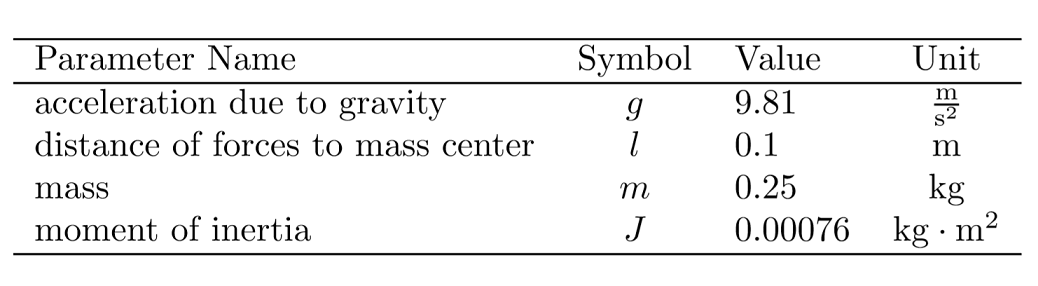
Edit
simulation.pyadjust
def simulate()define initial state values
xx0, simulation timetendand vector of times for simulationttin case you don’t want to define an inputfunction, which is different to the
uu_default_functionremoveuu =andsimulation_data.uu =. Theuu_default_functionis automatically used as inputfunction. Otherwise:define inputfunction
uu
adjust
def save_plot()plot the relevant and representing data of your model here
if you want to create multiple plots, either use subplots or create them separately and always call
save_plot_in_dir(<plot_name>.png)after each plot. Make sure to chose unique names. Plots will appear in alphanumeric order.
adjust
def evaluate_simulation(simulation_data)fill in the
expected_final_statesof your model to check whether everything is working out
Go to
_system_model_dataadjust
documentation.texupdate the headline with your system model name
explain parameters, inputs and state components in the subsection
Nomenclature for Model Equationsin contrast to the parameter table, here you can explain the parameters in more detail
the table is intended for a quick overview of the parameters and is automatically build based on
parameters.py
define state vectors, input vectors and system equations
list parameters and outputs; if they don’t exist just fill in
<not defined>specify the assumptions underlying this model (e.g. neglected fast subsystems, valid ranges of system quantities)
optionally fill out the section Derivation and Explanation (how was the model derived, what is important to know)
add your references
Update the
parameters.texviaackrep --update-parameter-tex <key>Create the
documentation.pdfviaackrep --create-pdf <key>Test your model locally:
ackrep -csm <key>=ackrep --check-system-model <key>